
Jieyi's numerical answer type questions are designed to be reusable, standardized, and fair. Here's an example of how they work.
A numerical-entry hiring item is a question where the candidate enters a number (typically in a box) or selects from a list of numbers. There are two basic types of numerical-answer items:
The first type is the button-selected numerical reasoning multiple-choice question, which has a numeric value and unit (e.g., “240 inches”) as one of its options, along with other possible answers. The second type is a number box where the candidate types in their own number, optionally paired with a required unit.
In this post I’m going to walk through my approach to designing numerical-answer hiring items. First, I’ll talk about how to choose calculations that mirror job duties, then I’ll present a reusable hiring-item template. Finally, I’ll go over scoring rules and common pitfalls to avoid when interpreting the results.
Job-aligned calculation categories
When I design numerical-answer items, I think about what calculations would be useful to someone in the role being assessed. This means grouping together prompts that are related to reading workplace data and applying the arithmetic needed to make decisions based on it.
There are many ways to do this, but here’s how I usually categorize them:
Tables and data checking: Reading and understanding tabular data, and using it to find values that are not immediately obvious.
Charts and trends: Reading and interpreting charts, graphs, and other visualizations of data.
Percentages and change: Calculating percentages, percentage points, and percentage changes.
Ratios, rates and proportions: Calculating ratios, rates, and proportions.
Numerical word problems: Applying math to solve problems described in words.
Basic arithmetic: Addition, subtraction, multiplication, division.
Number series: Identifying patterns in sequences of numbers.
Mathematical knowledge: Geometry, algebra, statistics, probability.
I try to include a few examples from each of these categories, so that different people will find something they’re good at. But if you’re only looking to assess numeracy skills, you can focus on some categories more than others.
Reusable hiring-item template
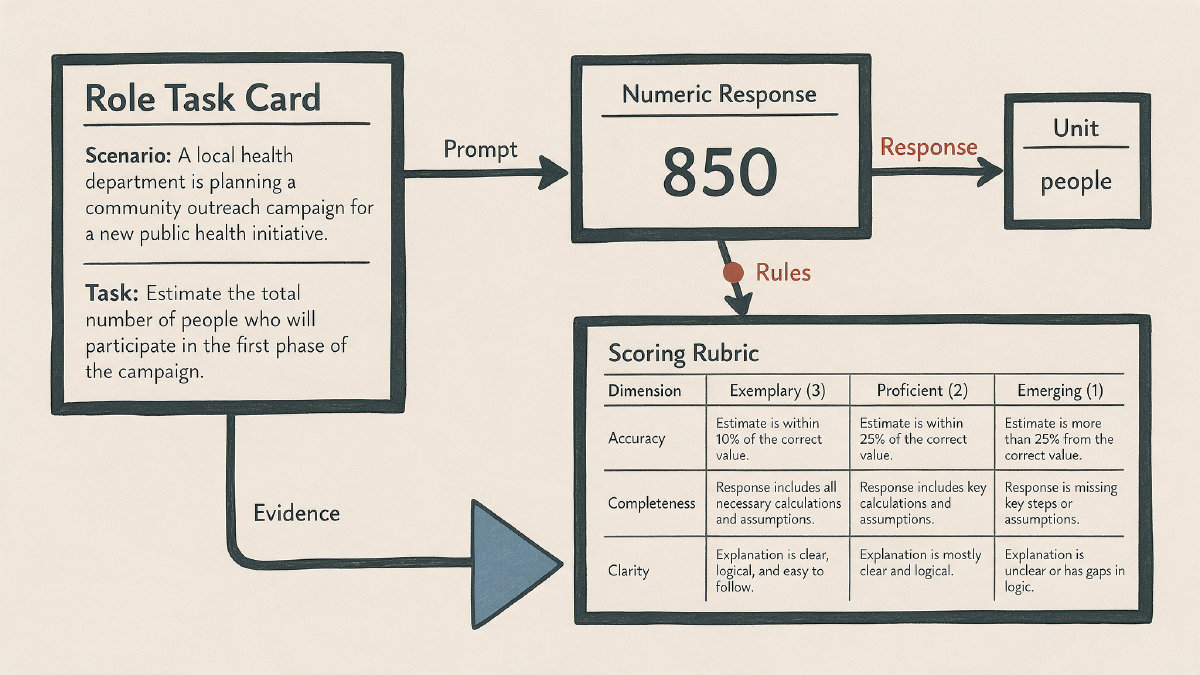
Here’s a typical hiring-item template that I use. It includes a realistic prompt, all necessary facts or table values, a numeric accepted response, explicit handling of units, and a worked solution.
The realistic prompt presents a workplace decision and the facts or table values needed to make it. I then define the accepted numeric response, specify a required unit or use a separate unit field, provide a worked solution, and use separate number and units boxes when units matter. For example, a packing clerk sees three rows of box dimensions and must enter the total length of 20 trays at 12 inches each: “240” in the Number box and “inches” in the Units box, with the worked solution showing 20 × 12 = 240. SHL describes numerical reasoning tests this way too—using facts and figures in statistical tables and selecting a button for each answer—and Pearson says correct answers are entered in Number and Units boxes.
You might want to check out this article about how to write realistic hiring scenarios, since those tend to be the most important part of any assessment.
Unit scoring rules
Fair unit scoring is crucial. For instance, if you ask a question about distance and want to allow feet or inches, you need to set up both as accepted units with the correct conversion: “1 ft” can be equivalent to “12 in”, but “1 ft” is not equivalent to “240 in”. If you don’t support a unit cleanly, your test becomes unfair and biased against candidates who reasonably used that unit. Similarly, you can accept both “ft” and “feet” when both are listed as accepted units, but the case of unit symbols has to follow the rules you publish.
How do I handle this? I always check the unit before the numeric value. If a candidate writes “FeEt” when “feet” is the required accepted form, that is not the same unit. I require the accepted abbreviation or word, correct case when case matters, no periods after abbreviations like “in”, and no extra spaces.
If you really want to support conversion between equivalent units, you can have a separate field for units. But I prefer to just accept either equivalent unit, and let the system handle the conversion automatically.
But sometimes you’ll want to require the exact unit used in the prompt. For instance, if the answer must be reported in minutes, you can require “60 minutes” and use exact unit matching even though “1 hour” represents the same duration. So I recommend having a setting where you can specify whether you want to accept equivalent units or require the specified unit.
By default, I accept equivalent units when the platform can convert them correctly. I use exact unit matching when the role needs a specific unit. I do not give credit for non-equivalent units, because the unit check comes before the numeric-value check.
Rounding and tolerance
Another thing to watch out for is rounding. You need to decide ahead of time what kind of tolerance you want to apply to your answers. Most platforms have defaults for this, and I suggest treating those as configurable settings rather than universal hiring standards.
So what should your grading tolerance be? I typically set 2% as a general default, though 2–3% is typical. Usually, we use 2% for acceptable variation or rounding error, with 3 significant figures as the answer-format display. I also tend to round up instead of down when there’s ambiguity.
Before administering the assessment, you need to tell your candidates what kind of rounding they should expect. Don’t just rely on documented platform defaults. Instead, treat those as configurable settings, and make sure everyone knows what to expect.
Also, make sure that your instructions explicitly state what kind of rounding you expect. Otherwise, your candidates might guess incorrectly.
Response-entry rules
For response-entry rules, I emphasize plain numeric values and accepted units for value-with-units items. In other words, if the item asks for a distance, the candidate should enter “240” in the number box and select “inches” from the dropdown menu. They shouldn’t enter mathematical expressions like “12+12”.
In fact, I don’t even allow mathematical expressions. We’ve had too many candidates who entered formulas into our numeric answer boxes, thinking they were answering the question correctly. But unless you’re asking for a formula, you want the candidate to enter a numeric value.
Interpreting assessment results
Now, once you have a bunch of numerical-answer items, how do you interpret the results? One approach is to compare raw accuracy. How many people got the right answer? What percentage of people answered correctly?
But I think this is misleading. Raw percentage accuracy tells you very little about what the score means. It depends on how hard the question was, and how good the reference group was. A question that’s easy for one group may be hard for another.
Instead, I recommend comparing scaled or percentile interpretations. For instance, if you use an official scoring algorithm, it may account for the questions and their difficulty, then compare performance with a reference group. Separately, you could say something like “this person answered 60% of the questions correctly”, but that is raw accuracy, not an official adaptive score.
But neither of those approaches is ideal. Percentile scores are better because they give you a sense of how well someone did relative to other people. However, they still depend on the difficulty of the questions, and how good the reference group was.
That said, percentiles can still be a useful measure of job fit. For instance, if you’re trying to hire someone for a specific position, you could say something like “we targeted a percentile of 60 for this role”. Or you could say something like “we targeted the 60th percentile for this role”, while making clear that this means outperforming 60% of the reference group, not answering 60% correctly.
Either way, you need to make sure that your team understands what a homegrown numeric score can and cannot show about job fit. Numerical-answer items are great for assessing numeracy skills, but they can’t tell you everything about how well someone fits a particular job.
Standardized test conditions
Before candidates begin the assessment, you must standardize the conditions under which they take the test. Format differences, access differences, and other factors can become hidden item difficulty. Some calculators may be allowed while others are not, depending on the test. Time constraints must be specified, and timed assessments must be clearly communicated. Precision and rounding expectations must be specified. Accepted units must be specified. Candidate feedback mechanisms must be established. And non-default significant figures in instructions must be specified.
Finally, there are a few design and interpretation warning signs that weaken the hiring signal from numerical-answer items. These include:
Ambiguous units
Unstated rounding rules
Irrelevant math tricks
Total plus component double-counting
Percentage-point difference versus percentage growth
Different adaptive difficulty levels
Do not compare accuracy alone